
Start with two slices
for a small WordPress site
Affiliate disclosure: We may earn a commission from some provider links at no additional cost to you.
Slice-count buying guide
InterServer prices VPS by slice count, so the real question is not which plan looks cheapest but how many slices the workload actually consumes once Docker, a database and a control panel are included.
--- title: "InterServer VPS Review 2026: How Many Slices Do You Need?" slug: interserver provider: InterServer providerId: interserver description: "How many InterServer VPS slices do you need? Compare Linux pricing, WordPress and Docker starting sizes, and the conditions for managed support at eight slices." date: 2026-10-31 updatedAt: 2026-10-31 category: Review ---

for a small WordPress site
for Docker with a database
when the workload or managed support justifies it
These are starting estimates; plugins, background jobs and traffic will decide the final size.
InterServer's appeal is straightforward: Linux VPS plans start at $3 a month, with monthly billing. The confusing part is the slice count. Buying twice as many slices doesn't necessarily double the CPU allocation. (Linux configurations, billing FAQ.)
This review covers Linux Cloud VPS, with published prices checked on October 31, 2026. Windows and Storage VPS are separate products.
A slice is InterServer's unit for choosing a resource bundle. The table below lists the slice sizes available in our database, so start with the smallest one your workload could survive on.
| Plan | CPU | RAM | Storage | Traffic | Price | Link |
|---|---|---|---|---|---|---|
| 1 Slice | 1 vCPU | 2 GB | 40 GB SSD | - TB | $3 / MonthMonth | View |
| 6 Slices | 3 vCPU | 12 GB | 240 GB SSD | - TB | $18 / MonthMonth | View |
| 5 Slices | 3 vCPU | 10 GB | 200 GB SSD | - TB | $15 / MonthMonth | View |
| 8 Slices | 4 vCPU | 16 GB | 320 GB SSD | - TB | $24 / MonthMonth | View |
| 3 Slices | 2 vCPU | 6 GB | 120 GB SSD | - TB | $9 / MonthMonth | View |
| 2 Slices | 1 vCPU | 4 GB | 80 GB SSD | - TB | $6 / MonthMonth | View |
| 4 Slices | 2 vCPU | 8 GB | 160 GB SSD | - TB | $12 / MonthMonth | View |
| 7 Slices | 4 vCPU | 14 GB | 280 GB SSD | - TB | $21 / MonthMonth | View |
Prices use the original database billing cycle: annual plans remain labeled per year rather than being presented as monthly plans. CPU model is not stored in the current database, so verify the host CPU after deployment when it affects your workload.
Prices are in USD before panel licenses, other add-ons and applicable taxes. Confirm the selected configuration and location at checkout.
The three-slice plan deserves a look: $3 more than two slices buys a second listed core. Moving from three to four adds RAM, disk and transfer, with the core count staying at two. Choose based on the resource your app actually needs.
Here's how I'd narrow down the choice.
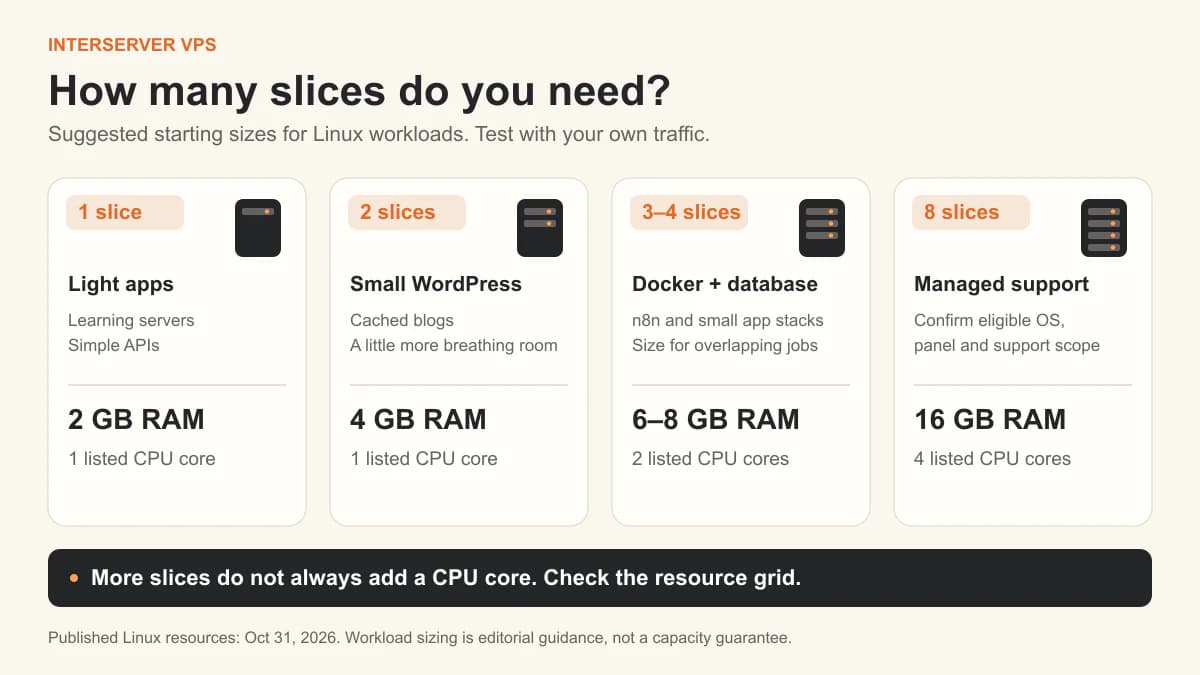
I'd use one slice for a learning server, a simple API or a small app with few background tasks. Memory can get tight once you add a database and control panel.
For a small WordPress blog, I'd budget for two slices to give PHP and the database more room. Test uncached pages, the admin area and scheduled jobs. A cached blog and a WooCommerce store can place very different demands on the same server.
Watch the CPU as well as RAM. If one core is already busy, the two-slice tier won't fix that particular bottleneck.
Three slices are a sensible first candidate for a modest Docker Compose stack with a database. They exceed the starting budget in our n8n VPS guide: two vCPUs and 4 GB RAM for its small PostgreSQL-backed setup.
I'd consider four slices when several containers run together, jobs overlap, or the database needs more memory. Browser automation, large file processing and busy workflows can quickly change that budget.
During a paid evaluation, check memory pressure, sustained CPU use, disk growth and response times during your busiest tasks. Upgrade when those measurements show you need more room.
The older Managed Support Guidelines, originally published in 2015, also specify a control-panel condition. Ask InterServer to confirm coverage for your OS, panel and application stack before choosing eight slices mainly for management.
Getting a failed database service running and fixing an n8n workflow are different jobs. That distinction matters more to me than the word “managed” on its own.
The VPS upgrades page lists cPanel at $15/month and DirectAdmin at $8/month. On that basis, eight slices plus cPanel would be $39/month before tax and other extras, using the listed $24 server price. Check the license tier and current order total.
You can also administer a compatible Linux stack from the command line. If you want managed help, confirm whether a panel is required for your configuration.
InterServer lists New York City metro, Dallas and Los Angeles on its VPS locations page. The NYC metro options include Secaucus, New Jersey. Availability depends on the product and current stock.
I'd shortlist a location near the users and any database the app contacts frequently. For an Asia-facing site, test the actual route before choosing Los Angeles on geography alone.
Measure uncached page or API response times during busy periods. A resource table can't establish the fastest location or predict your app's performance.
VPS backups do not run by default, according to InterServer's terms. Set up scheduled backups for the database, uploaded files and configuration, with an independent copy outside the server. Our Docker backup guide includes a restore test.
The billing FAQ describes month-to-month billing. Adding prepaid account credit covers future invoices without lowering the monthly rate.
Treat the first month as a paid evaluation. Cloud VPS has no trial or general money-back guarantee. The refund explanation allows refunds before provisioning begins, but says they aren't available after the service is set up and delivered.
If you leave, cancel through the account in time: the terms require cancellation at least three days before automatic renewal so a late request can take effect after the next renewal period.
For another approach to a self-managed VPS dashboard, see our Hostinger review. For a wider choice of compute families and regions, read the Vultr review.
It can be enough for a light installation, but I'd start at two slices for a small live blog to give PHP and the database more memory. Plugin choice, caching and background work matter more than a universal visitor limit.
Yes. InterServer's VPS FAQ says you can increase the slice count and pay the difference between the old and new monthly prices. Ask about any restart or disk-expansion steps before upgrading a live server.
Budget for a separate license. The upgrades page lists cPanel as a paid add-on; eligibility for managed support doesn't establish that the panel license is included.