
Choose Self-Managed VPS if
you can maintain Linux and want control over your software.
Affiliate disclosure: We may earn a commission from some provider links at no additional cost to you.
Self-managed vs managed buying guide
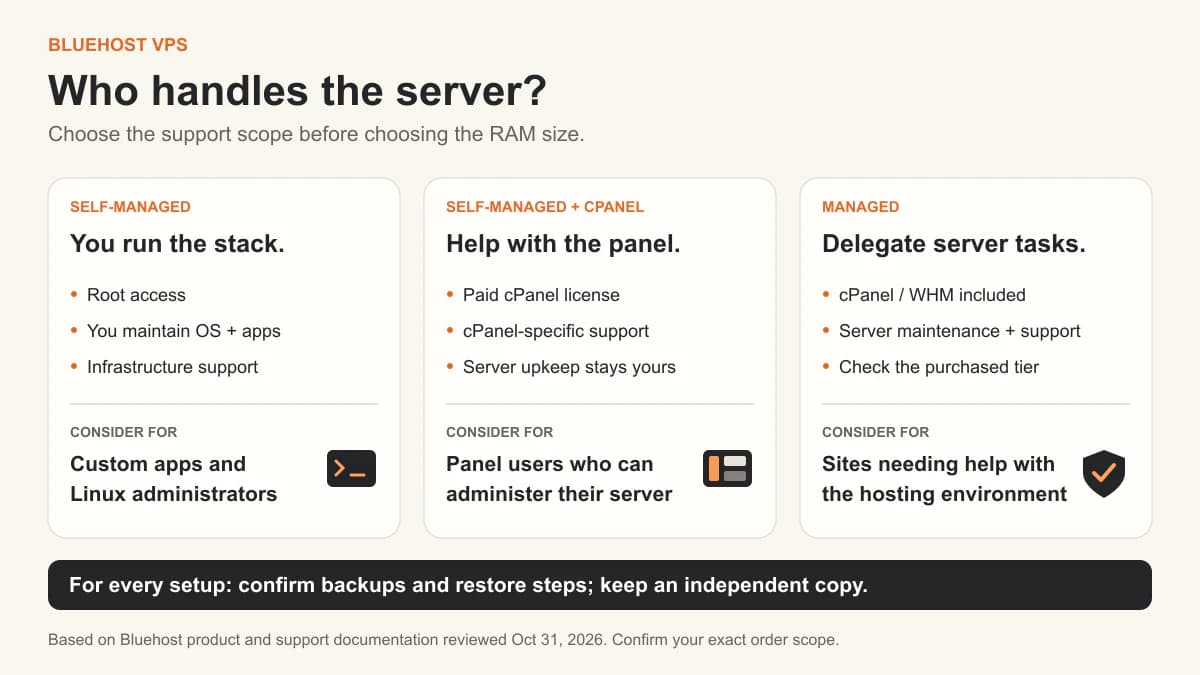
Bluehost sells three different VPS products under one name: self-managed, self-managed with cPanel, and fully managed. The price gap is mostly a labour decision, so decide who runs the server before you compare the plans.
--- title: "Bluehost VPS Review 2026: Self-Managed or Managed?" slug: bluehost provider: Bluehost providerId: bluehost description: "Bluehost self-managed vs managed VPS: compare prepaid prices, renewals, cPanel costs, WordPress support and Docker suitability before choosing a plan." date: 2026-10-31 updatedAt: 2026-10-31 category: Review ---

you can maintain Linux and want control over your software.
you want help running the hosting environment, and that support covers the work you need.
I'd make that decision before picking a RAM size.
Bluehost sells these as separate VPS products. This review compares their published features and USD prices, checked on October 31, 2026.
Root access and infrastructure support. You set up, secure, update and troubleshoot the server and apps.
A hosting panel and cPanel-specific support. You administer the server and handle work outside the panel support scope.
cPanel/WHM and a server-management service. You maintain your business application and arrange help for work outside the purchased support package.
Sources: Bluehost's management comparison, cPanel licensing guide and Managed VPS page.
On the self-managed path, Bluehost maintains hardware, networking and virtualization; you manage the OS and applications. (Infrastructure support description.)
The plans below come from our own database rather than from the review notes. Billing cycles differ between plans, so read the cycle before comparing monthly figures.
| Plan | CPU | RAM | Storage | Traffic | Price | Link |
|---|---|---|---|---|---|---|
| NVMe 8 | 4 vCPU | 8 GB | 200 GB NVMe | - TB | $12.99 / MonthMonth | View |
| NVMe 2 | 1 vCPU | 2 GB | 50 GB NVMe | - TB | $4.69 / MonthMonth | View |
| NVMe 4 | 2 vCPU | 4 GB | 100 GB NVMe | - TB | $9.49 / MonthMonth | View |
| NVMe 16 | 8 vCPU | 16 GB | 450 GB NVMe | - TB | $25.99 / MonthMonth | View |
Prices use the original database billing cycle: annual plans remain labeled per year rather than being presented as monthly plans. CPU model is not stored in the current database, so verify the host CPU after deployment when it affects your workload.
Sources: self-managed plan cards, self-managed pricing reference and managed plan cards. Initial totals are the listed rate multiplied by the term length; renewal rates correspond to the same term.
Bluehost's banners and some pricing modules showed different promotional figures. This table follows the named plan cards. Confirm the amount due, term and renewal rate in checkout.
I'd pay particular attention to NVMe 8: another 24 months at the listed renewal rate would cost $695.76 before extras, compared with $311.76 for the first term.
The managed example also requires a longer commitment: three years versus two. Matching resources alone doesn't establish equal service or performance.
cPanel/WHM is included with Managed VPS; it costs extra on Self-Managed VPS. Bluehost's license guide lists the five-account cPanel Admin tier at $14.99/month. Higher tiers cost more.
Using the published rates, NVMe 4 plus that license comes to $24.48/month initially, or $587.52 over 24 months, before tax and extras. The license term follows the VPS term.
The add-on includes cPanel-specific support, with a narrower scope than server management. Decide before ordering: Bluehost describes its own license add-on as an initial-purchase option.
The managed product page describes server setup, monitoring, security updates and maintenance. Those are useful services if nobody on your team wants to maintain the hosting stack.
The more useful detail is in Bluehost's VPS support matrix. Its managed columns include help with database connection errors, PHP settings, SSL and certain WordPress errors caused by plugins or themes. The matrix excludes deep plugin/theme compatibility troubleshooting, custom coding and custom repair after a hack.
It also separates standard managed and premium support; custom software installation appears in the premium column. Check which level your order includes.
I'd ask sales: “Can your team maintain this stack and help if this service fails?” That gives you something concrete to compare.
Managed VPS is worth considering when a site needs more control and its owner wants help with the hosting environment.
First establish why the current site is slow. A heavy plugin, a poor database query and too little RAM need different fixes. Visitor count alone won't tell you which plan to buy.
For a migration, confirm whether help covers the site, email and unusual configuration. Test login, uploads, checkout and scheduled jobs before switching DNS.
Self-Managed VPS is the route I'd compare first for a custom container stack. Bluehost's VPS page explicitly lists Docker/Compose deployment and custom software.
NVMe 4 matches the two-vCPU, 4 GB starting budget in our n8n installation guide. Treat it as a test size; heavy workflows, browser automation and overlapping jobs can need more.
Our Docker guide and VPS security checklist cover the setup. For a managed container deployment, confirm support for that exact stack before buying.
Confirm the backup service and schedule for your specific order. The managed sales page mentions backups, but the KVM backup policy says customers are responsible for their own backups and that courtesy backups are no longer maintained for KVM VPS.
Bluehost's maintenance guide says managed customers can work with the team to configure scheduled snapshots. Together, those pages don't establish an automatic backup schedule for every VPS.
Confirm frequency, retention, storage location and the restore process. Keep an independent application backup outside the server and test a restore; our Docker backup guide covers that process.
The self-managed page lists Virginia, Arizona, London, Toronto and Amsterdam; the managed page advertises a broader list. Confirm availability for your product in checkout, then test response times from your audience's networks.
Read the refund policy before committing to a prepaid term. It offers a 30-day guarantee for eligible new VPS hosting purchases, while excluding monthly-term services, domains, setup fees and various extras. It also states that products auto-renew by default. Check the renewal settings after purchase.
I'd shortlist self-managed Bluehost for a custom stack I could maintain myself. Managed VPS becomes more appealing when its support covers work I'd otherwise need to hire someone to do. Compare the full bill, including cPanel and renewal, with that division of work in mind.
For another self-managed dashboard approach, see our Hostinger VPS review. For a wider range of regions and compute types, compare Vultr.
Managed VPS is the more approachable option for someone who needs server help, provided its support covers the intended site. Self-Managed VPS requires the owner or an administrator to handle Linux maintenance and troubleshooting.
No. Bluehost describes cPanel-specific support with its self-managed license add-on. Full server management has a separate scope, so check the service attached to the order.
The example offers above require 24- or 36-month prepayment. Their advertised monthly figures are averages across that term. Shorter terms may have different prices; check the amount due before paying.