
Ollama with a small model, a chat interface, one user at a time.
AI VPS sizing guide
AI VPS Requirements Guide: CPU, RAM and Storage Explained (2026)
What an AI VPS actually needs from its CPU, RAM, storage and network. Plain-language requirements for Ollama, LLMs, chatbots and agents, with a table for every size.
Choosing an AI VPS usually comes down to four questions: how much RAM, which CPU, what storage, and whether you need a GPU. Answer those and the rest is price. Most projects run happily on four cores, 16 GB of RAM and NVMe storage, and the parts people overspend on are the ones they never use.
Buy the wrong part and you feel it every day. A slow CPU makes every response crawl, too little RAM stops models loading at all, and a mechanical disk turns a two-minute model download into twenty. Buy more than you need and you pay for it every month. Most of these mistakes are avoidable with five minutes on the spec line.
What Hardware Components Matter for an AI VPS?
Five parts decide what an AI VPS can do: CPU, RAM, storage, GPU and network. Only one or two are usually the real constraint, and which ones depends on the workload rather than on the price.
The table is the whole guide in one place. Everything below explains why each row matters.
| Component | Beginner | Advanced |
|---|---|---|
| CPU | 4 cores | 8+ cores |
| RAM | 8 GB | 32 GB+ |
| Storage | 80 GB NVMe | 200 GB+ NVMe |
| GPU | Optional | Recommended |
| Network | 100 Mbps+ | 1 Gbps+ |
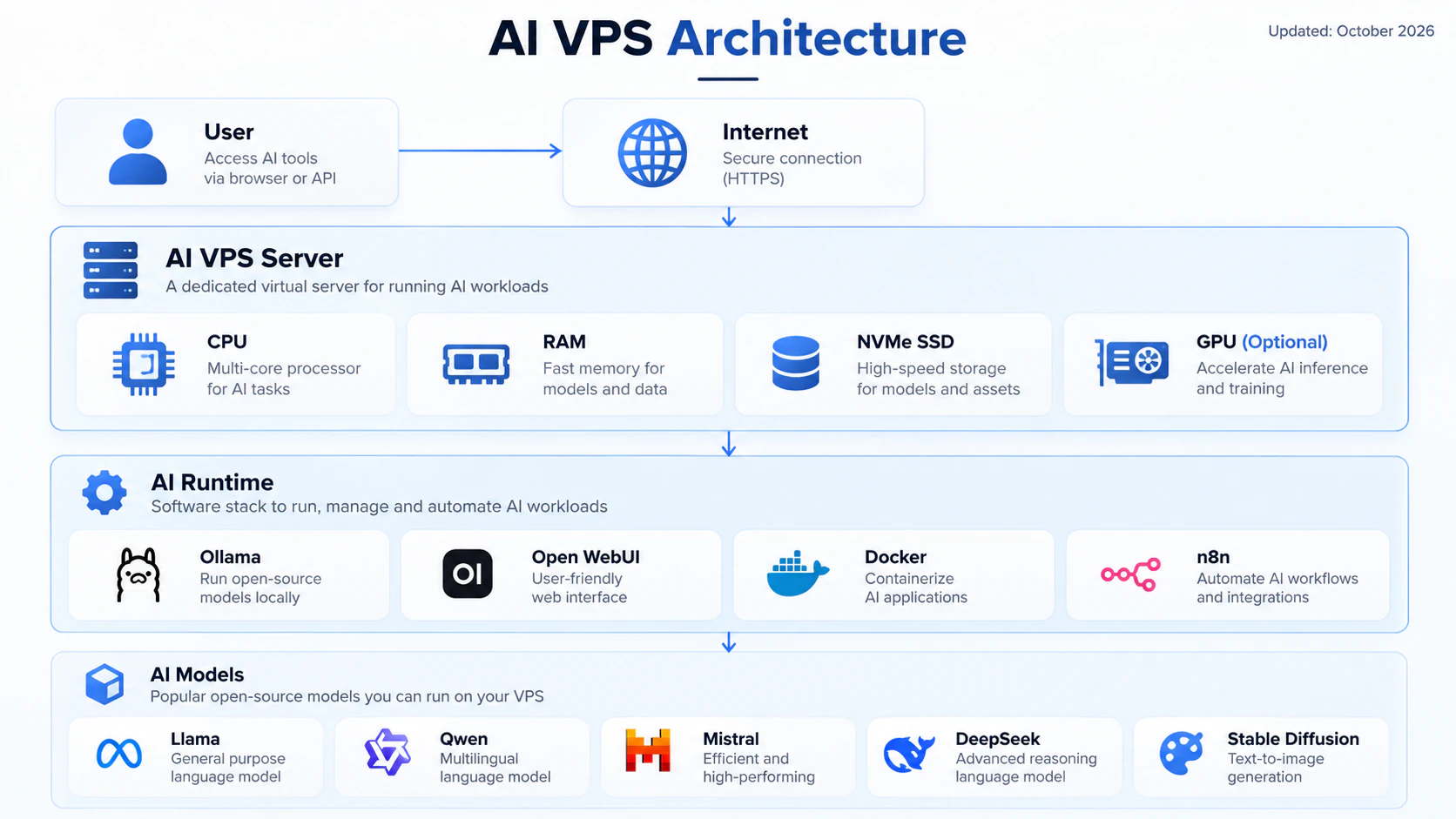
What you need before you size anything
- The AI tool you plan to run, and whether it does its own inference
- The model size you expect today, not the one you might run next year
- How many people will use it at the same time
How to size it in three steps
01
Decide where inference happens
An app that calls an external model API needs very little hardware. A local model needs RAM for the weights and CPU for the answer. That single answer settles most of the specification.
02
Size RAM for the model, CPU for the response
RAM decides whether the model loads. CPU decides how fast it replies. Storage is what makes both of them feel fast or slow.
03
Buy monthly, then measure
Run your own prompts for a week on a monthly plan. Watch CPU and memory before you commit to annual billing.
CPU, RAM and Storage: Which Matters Most?
For a first AI VPS the priority order is not the price order. Get these three in the right sequence and the plan will feel right:
- RAM first: it decides whether the model runs at all
- CPU second: it decides how fast the answer arrives
- Storage third: it decides how long loading takes, and how many models you can keep
CPU Requirements for an AI VPS
The CPU is the part that generates text on a CPU-only plan. When a model answers one token at a time, the speed you feel is mostly single-core speed.
A vCPU is not the same thing as a physical core. Providers oversell, so two vCPUs on one host can behave very differently from two on another. Ask which CPU model the plan runs on, and treat the core count as a starting point rather than a guarantee.
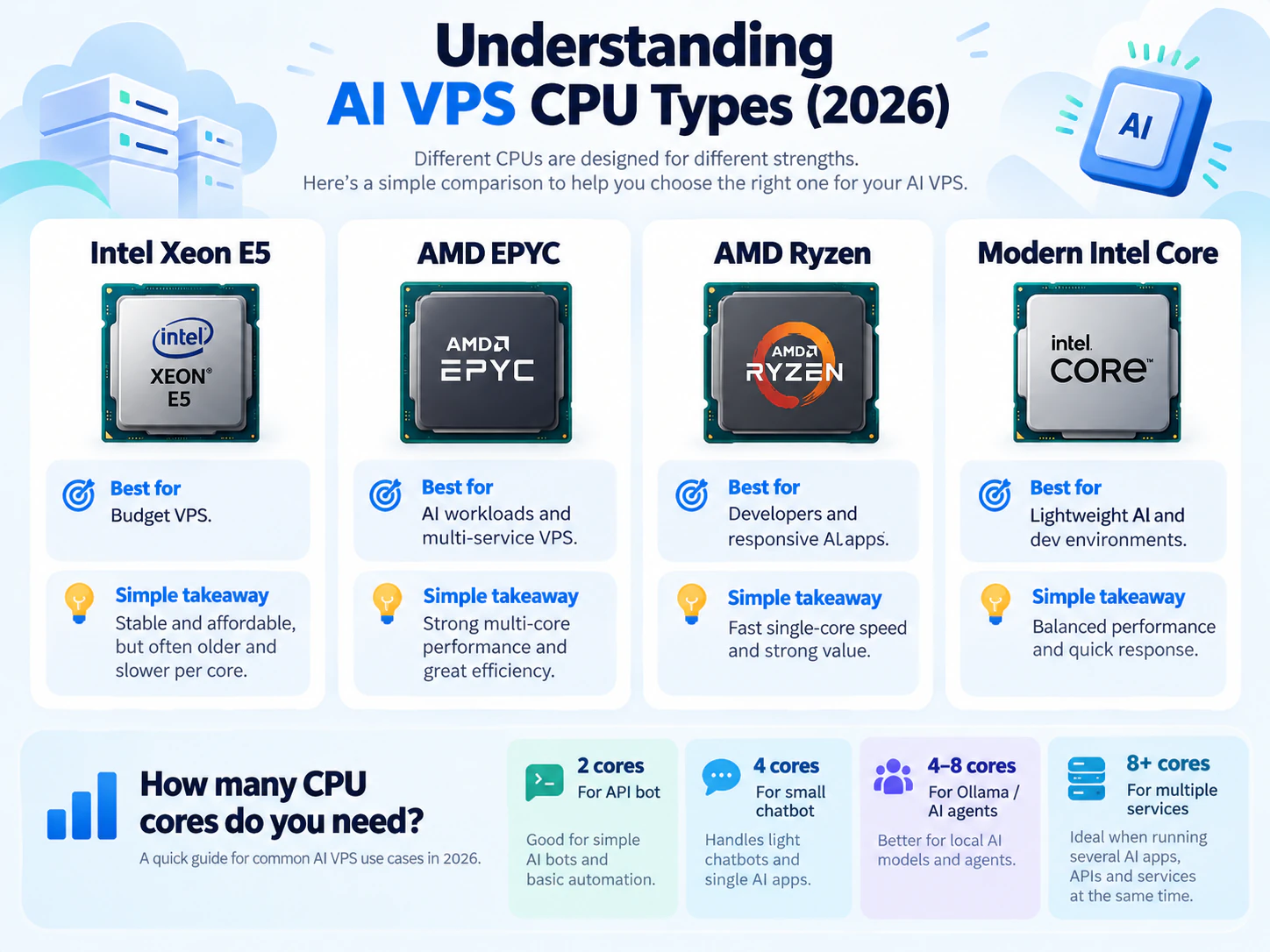
Inference speed also depends on the core count, the clock frequency and the memory bandwidth together, not on the CPU name alone. The four families below tell you the platform, not the whole story.
| CPU type | Performance | Best for |
|---|---|---|
| Intel Xeon E5 | Medium | Budget VPS, websites, light AI |
| AMD EPYC | High | AI workloads and multi-service servers |
| AMD Ryzen | High single-core | Developers, responsive AI apps |
| Modern Intel Core | High | Lightweight AI, dev environments |
How Many CPU Cores Does an AI VPS Need?
Cores are not the whole story, but they set the floor. Two cores handle a small bot. Anything generating text locally wants four or more, because inference will use every core you give it while other services wait.
In practice: a Telegram bot that calls an external model runs fine on two cores. The moment the same server loads a 7B model locally, four cores is the difference between a usable assistant and one that stalls every time a second request arrives.
| Usage | Recommended CPU |
|---|---|
| AI API bot | 2 cores |
| Small AI chatbot | 4 cores |
| Ollama | 4-8 cores |
| AI agents | 4-8 cores |
| Multiple AI services | 8+ cores |
RAM Requirements for AI VPS
RAM decides which models you can run at all. It has to hold the model weights, the cache for the conversation, the operating system and every container beside them.
Model size is the starting point, and quantization changes it most. A 4-bit quantized 7B model needs roughly 4.5 GB for the weights, while the same model at FP16 needs about 14 GB: three times the memory for the same model.
The model never gets the whole machine. Ubuntu, Docker, Open WebUI and a database take their share first, so leave 2-4 GB above whatever the model needs before you count a plan as big enough.
The arithmetic is worth doing properly once: work out the RAM an AI VPS needs before you compare prices.
| Model size | Recommended RAM |
|---|---|
| 3B models | 4-8 GB |
| 7B-8B models | 8-16 GB |
| 13B models | 16-32 GB |
| 30B models | 32 GB+ |
| 70B models | 64 GB+ |
Ollama VPS Requirements: How Much RAM Does It Need?
Ollama is the easiest way to run a local model, and its memory use follows the model rather than the tool. It loads a model on the first request and keeps it resident, so the first prompt after a restart is slower.
| Model | Recommended RAM |
|---|---|
| Qwen2.5 7B | 8 GB+ |
| Llama 3 8B | 8-16 GB |
| Mistral 7B | 8-16 GB |
| Large models | 32 GB+ |
Storage Requirements for AI VPS
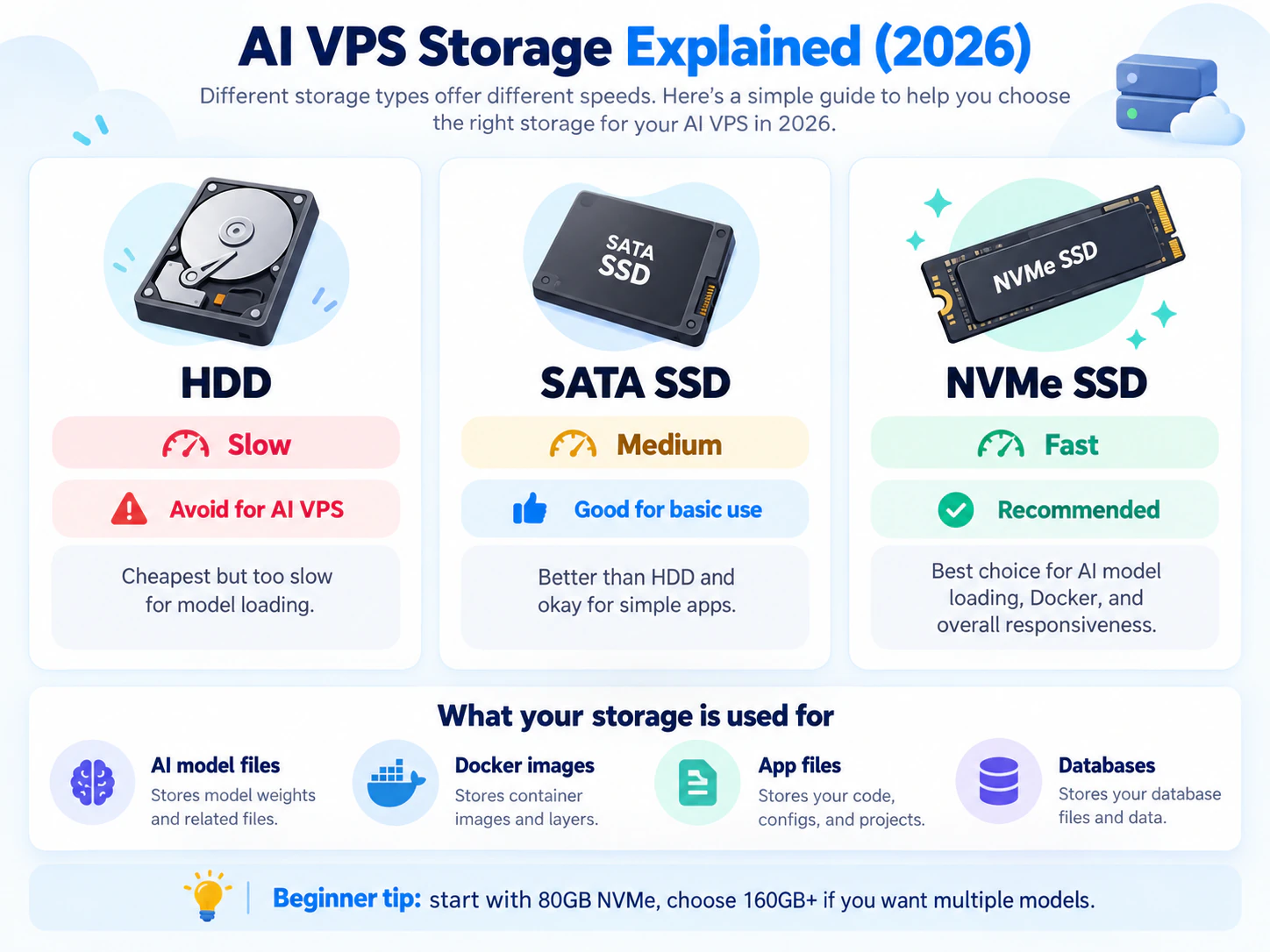
Storage is the specification beginners underestimate. Models are multi-gigabyte files, Docker images stack up and a database grows quietly in the background. Disk speed decides how long all of that takes.
Size matters too: 80 GB holds one or two small models, 160 GB gives you room to experiment, and 250 GB upwards is for keeping several models on disk at once.
Capacity and speed are separate things. A 500 GB SATA plan is not faster than an 80 GB NVMe one, and a bigger NVMe is not automatically quicker than a smaller one from the same provider. Choose the interface first, the size second.
Count the models you actually want to keep. Each 7B model at 4-bit is around 5 GB, so four of them is 20 GB before Docker images, logs and a database. That is what turns an 80 GB plan into a 160 GB one.
| Storage type | Speed | Recommendation |
|---|---|---|
| HDD | Slow | Avoid for AI |
| SATA SSD | Medium | Basic use only |
| NVMe SSD | Fast | Recommended |
| High-performance NVMe | Very fast | Advanced AI workloads |
Do AI VPS Need a GPU?
Usually not. Chatbots, agents, automation and text generation run on CPU hardware, which is why a cheap plan can run a local model at all.
The split is worth remembering: a CPU VPS is the right machine for inference on small and medium models, for testing and for anything text-based. A GPU is for training, large-model inference, and image or video generation. Paying GPU prices for a chatbot that calls an external API buys nothing.
| Workload | GPU needed |
|---|---|
| Chatbot | No |
| Ollama text models | Optional |
| AI agents | No |
| Stable Diffusion | Yes |
| Video AI | Yes |
| Large LLM | Recommended |
Network Requirements for AI VPS
Bandwidth and latency do different jobs. Bandwidth decides how quickly model files download and how many people can use the service at once. Latency decides how responsive remote access feels, which matters more when you work on the server interactively than when an API serves background jobs.
Most plans are generous on both, so the network rarely decides a purchase. It is worth checking on cheap plans, where 1 Gbps is sometimes a paid upgrade.
- Personal assistant: 100 Mbps is plenty
- Developer projects and API work: 500 Mbps
- Several users or a public service: 1 Gbps
What Can You Run on 8, 16 or 32 GB?
Those numbers only mean something next to a workload. Three configurations come up again and again:
- 8 GB VPS: Ollama with a small LLM and Open WebUI, one or two users. The cheapest plan that runs a local model properly.
- 16 GB VPS: an AI agent, n8n automation and a database beside the model, with a longer context.
- 32 GB+ VPS: larger 13B-30B models, several services at once, or a small team sharing one server.
Best AI VPS Configuration: Three Builds
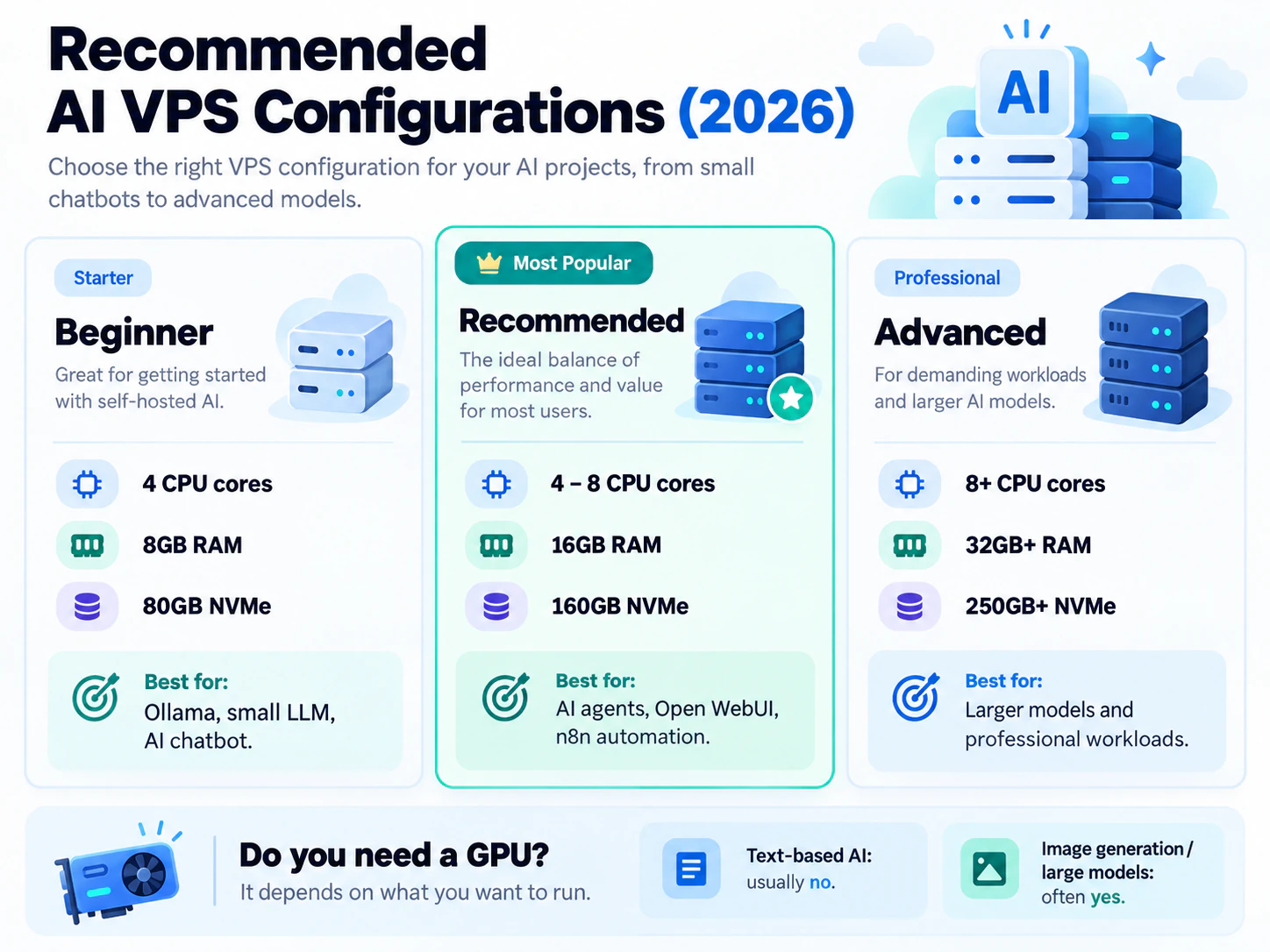
Three builds cover almost every self-hosted AI project, and the middle one is where most readers should land. Start cheaper than you think you need, measure for a week, then move up.
The Short Answer
For most people: 4+ cores, 8-16 GB RAM and NVMe storage. That runs Ollama, Open WebUI, an agent or two and an automation workflow without drama.
For advanced work: 8+ cores, 32 GB or more and 250 GB of NVMe, where the limit becomes the model rather than the server.
Skip the GPU unless you generate images or video. Then compare plans by the specification you just worked out rather than by price, or start on something cheap and upgrade once you have measured it.
VPS requirements
Buy for the workload, not the install command
AI agents, Open WebUI and n8n automation running side by side.
Larger models, several services, or a model server shared by a small team.
Common mistakes that cause real downtime
- Choosing on RAM alone: 16 GB on an old Xeon with a SATA disk feels slower than 8 GB on Ryzen with NVMe
- Buying the cheapest old-CPU plan, then wondering why local models answer slowly
- Choosing HDD storage, where every model download and container start takes minutes
- Paying GPU prices for a chatbot that calls an external API and never touches the GPU
Before you commit to annual billing
The provider names the CPU model, not only the core count
Storage is NVMe: ask, because many plan pages just say SSD
RAM fits the model you plan to run, with room left for Docker and a database
Port speed is at least 100 Mbps, and 1 Gbps if several people will use it
Frequently asked questions
What are the minimum requirements for an AI VPS?
A basic AI VPS should have at least 4 CPU cores, 8 GB RAM and SSD storage. NVMe is worth the small premium because models are large files.
Is AMD Ryzen better than Intel Xeon for an AI VPS?
Modern Ryzen usually wins on single-core speed, which is what text generation feels like. EPYC wins on multi-core, which matters when several services share the server. Older Xeon E5 platforms are cheap, but some have weak single-core performance and are a poor match for local models.
Is NVMe necessary for an AI VPS?
Not strictly, but it is the upgrade you notice most. Models are multi-gigabyte files: NVMe loads them in seconds, SATA takes noticeably longer, and HDD is painful.
Do AI VPS need a GPU?
Only for image generation, video AI and large models. Chatbots, agents and text generation run well on a CPU VPS.
Next step
Keep the deployment moving
Sources and further reading
- Ollama: model library and file sizes
- Ollama: FAQ
- Open WebUI: documentation
- Ubuntu Server: documentation
Commands assume a fresh Ubuntu server. Replace domains, users, database names and provider-specific values before running them. VPS sizing is a practical starting point, not a guarantee: monitor the real workload and resize when CPU, memory, disk or network headroom becomes tight.